


Lidl Plus
3.7741.00 Reviews
App Specs
- Version
- 17.11.5
- Updated On
- License
- Free
- Downloads
- 100,000,000+
- Developer
- Lidl
- Categories
- Shopping
- Platform
- Android, iOS
Screenshots
 Analysis by AppCompare
I find Lidl Plus most useful when I treat it as a small part of a shopping routine, not as a reason to shop differently. Before opening it, I decide what I need; then I check whether any Lidl offers fit that list. That order matters: it keeps the app focused on helping with a trip I was already planning, rather than turning browsing into extra purchases.
Choose the right role for the app
For a regular Lidl shopper, a dedicated offers app can be worth the brief check before leaving home. For someone who shops across several supermarkets and wants to compare prices first, a broader comparison service may be more useful. I see Lidl Plus as a retailer-specific companion, not a one-stop guide to the cheapest shop.
That distinction also helps answer a practical question: do I need it if I already use a paper list or notes app? Not necessarily. I would keep my usual list as the source of truth and use Lidl Plus only to check for relevant advantages. If the app adds useful information, keep the habit; if it makes the trip feel more complicated, the list alone is enough.
Making the app part of a Lidl trip
I find it helpful to decide what I need before opening Lidl Plus, then use the app to check whether any current advantages match that plan. That section looks at how this list-first habit can fit into an ordinary Lidl trip, while the next part considers a few settings and preparation choices that can make the routine easier to manage.
A useful routine starts before you leave home
My most reliable approach is to check the app while making a shopping list, rather than opening it only once I am already at the checkout. That small change gives me time to notice whether an offer fits something I actually planned to buy. A discount is only a saving when it applies to a purchase I would make anyway; adding an unnecessary item to the basket can easily cancel out the benefit.
Because this is a shopping app from Lidl, its value is naturally tied to shopping with that retailer. The developer is Lidl, and the app is free, so trying it does not require paying for the app itself. In return, I would expect to spend a little attention checking what is relevant and preparing to use any benefit during a real shop. It is a fair exchange for regular Lidl customers, but less compelling for someone who visits only occasionally.
For a practical example, imagine I am stopping at Lidl after work to pick up dinner ingredients and a few household essentials. I would check the app before leaving, compare its offers with my list, and keep only the useful ones in mind. At the store, I can focus on finding the items rather than browsing every promotion from scratch. The important habit is to connect each offer to a planned purchase instead of letting the offer dictate the shopping list.
Worth Reading Before You Choose

Baby Panda World Brings Quick Play to Modern Phones, but Its Game Library Feels Busy

ESPN’s Live Game View Makes Following Close Games Easier

QuizzLand Review: A Good Fit for Short Trivia Breaks, Not Every Player

Basketball Stars: Multiplayer Is Fast, but Can It Recover When Matches Go Wrong?

WEBTOON Turns Phone Updates Into a Better Reading Routine

Link to Windows Runs on Shared Habits, Not Social Feeds
That is also why I would not use Lidl Plus as my only planning tool. A paper list, notes app, or whatever I already use can remain the place where I decide what the household needs. The Lidl app has a narrower job: help me find advantages connected with shopping there. Keeping those roles separate reduces distraction and makes it easier to tell whether I am saving money or simply buying more.
Check the details before relying on an offer
One useful routine is to look at an offer when I have enough time to read its conditions, not while juggling a basket at the checkout. Promotions can have specific requirements, and a headline discount alone does not tell me whether my intended item or purchase qualifies. I would verify the wording in the app before counting the saving in my budget.
I would also make a quick final check before paying. That is a sensible safeguard for any offer-based shopping routine: confirm that the relevant benefit is ready to use and that I have followed the steps shown in the app. It is better to spend a moment checking than to assume that simply having the app installed applies a discount automatically. I would not treat a remembered offer from an earlier visit as current; I’d check what is available for the trip I am making now.
Settings and habits worth checking
I would start by reviewing the app’s available settings and choosing only the options that make it easier for me to keep up with relevant Lidl information. If I prefer fewer interruptions, I would avoid enabling alerts just because the app offers them; if I want reminders about current advantages, I would consider whether those alerts genuinely help. The right choice depends on how often I shop there and how much promotional information I want on my phone.
I would also check that the app is ready before a trip rather than discovering a setup issue in a busy store. Opening it at home gives me a chance to sign in or complete any steps it asks for, and to become familiar with where the current offers appear. I’m not assuming any particular account requirement or feature beyond what the app presents; the practical point is simply to avoid making the checkout the first time I try to use it.
For repeat visits, I’d build a small, consistent sequence: list first, app check second, and a quick review of the relevant offer details before paying. Repeating the same order is more useful than trying to remember a collection of tips. It also helps prevent a common mistake: treating every promotion as a reason to change plans. If nothing in the app matches the list, I can shop as usual and move on.
Shortcuts that save attention, not just taps
The best shortcut here is a decision rule. I would ask, “Was this already on my list?” before acting on an offer. If the answer is yes, the app may help me reduce the cost of a planned purchase. If the answer is no, I would pause and decide whether I genuinely need the item. This simple filter keeps browsing from turning into impulse buying and makes the app’s benefits easier to judge over time.
Another useful pattern is to check Lidl Plus at a predictable point in the week, such as when I am planning the next Lidl shop. That can be more efficient than opening it repeatedly without a purpose. I can then note the offers that affect my list and ignore the rest. This is especially useful for households that shop on a routine, while someone who makes spontaneous, infrequent visits may not gain much from creating a new habit.
I would keep the app accessible in whatever way my phone normally allows, but I would not assume that a particular shortcut or widget exists. A repeatable sequence matters more than a special phone setup. If opening the app takes only a moment, the real efficiency comes from knowing what I am checking for and not wandering through offers without a plan.
Where it fits among shopping alternatives
Compared with a supermarket’s general website or a weekly paper flyer, a dedicated retailer app is easier to check on a phone while planning a specific Lidl visit. A general comparison app may be better when my main goal is finding the lowest price across several shops. Lidl Plus has a different strength: it concentrates on Lidl’s own shopping advantages rather than trying to compare every retailer in one place.
That focus is a benefit if Lidl is already part of my routine, because I do not need to sift through unrelated stores to find Lidl offers. It is also the main limitation. Someone who chooses a shop based on whichever supermarket has the best deal that week may prefer a broader comparison tool, even if they keep Lidl Plus for a visit they have already decided to make. I see the two approaches as complementary rather than interchangeable.
The app’s scale suggests that many shoppers are willing to try it: it has over 100 million installs, a 3.7 average rating, and around 1.8 million ratings. Those figures offer context, not a guarantee that every experience will be smooth. I would use the rating as one reason to set sensible expectations, then judge the app by whether its offers fit my own shopping habits and whether the checkout routine feels manageable.
Trade-offs and situations where I would skip it
The main trade-off is attention. To benefit, I need to check what is relevant, understand the offer, and remember to use the app at the right point in the shopping process. If I dislike managing promotions or already feel that shopping apps encourage me to buy extras, I may be better off sticking to a list and ignoring discounts that do not serve it.
I would also skip making it central to my routine if I rarely shop at Lidl. An app can be free and still cost time through setup, checking, and notifications. Occasional customers might find that the effort outweighs the value, particularly if they are already happy with the way they shop. Conversely, regular Lidl shoppers who enjoy planning around retailer offers are more likely to find a reason to keep it handy.
On the technical side, the current version is 17.11.5, and the stated minimum operating-system requirement is version 9. The content rating is Everyone. Those details help set expectations about compatibility and audience, but they do not change the central question: will I use Lidl often enough to make a dedicated offers app worthwhile?
A measured verdict for regular Lidl shoppers
I see Lidl Plus as a focused companion for people who already shop at Lidl and are willing to check offers with a plan. Its strongest use is not hunting for a bargain at any cost; it is matching a relevant advantage to something already on the list. A simple pre-trip check, careful reading of offer terms, and a final glance before payment are the habits that make it feel useful rather than distracting.
The app is less suited to shoppers who want one place to compare every supermarket, people who visit Lidl only rarely, or anyone who finds promotions hard to ignore. For them, a broader comparison tool or a straightforward shopping list may be a better fit. I would recommend trying Lidl Plus if Lidl is already one of my regular stops, while keeping a clear rule against buying something solely because it appears in the app.
Lidl Plus is free, rated for Everyone, and developed by Lidl; it was released on June 30, 2026. For a product with a substantial audience, that makes it an easy option to consider, but not an automatic must-have. My verdict is practical: use it when it supports a Lidl trip you were already planning, build a repeatable checking habit, and leave it aside when the offers do not match your real needs.
A small routine that keeps the value visible
After a few visits, I would judge the app by a simple question: did it help with purchases I already intended to make, without making the trip harder? I would not try to calculate a complicated return from every offer. Instead, I’d notice whether the benefits I actually used justified the few minutes spent checking and preparing. That keeps the decision grounded in my own habits rather than in the number of promotions on screen.
For shared household shopping, a useful approach is to agree on the list before anyone browses offers. That way, the person using the app can check relevant deals without quietly expanding the basket. If another household member does the actual shop, I would make sure the useful offer details are easy to communicate beforehand; the app is most helpful when the person planning and the person paying follow the same plan.
Overall, Lidl Plus suits shoppers who want a focused way to check Lidl-related advantages and are comfortable taking a moment to read conditions. It is not the right tool for every grocery routine, but with a list-first habit it can stay practical and controlled. I would keep it when it supports my normal shop, and skip the extra steps when it does not.
Pros
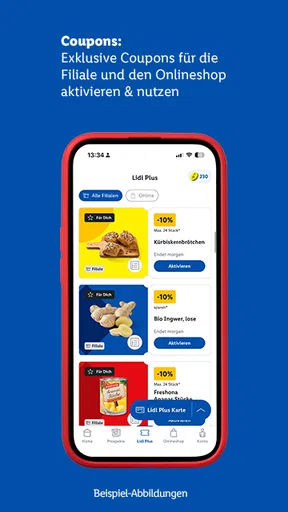
- Digital coupons make it easy to save on selected products.
- The rewards section offers chances to earn perks from purchases.
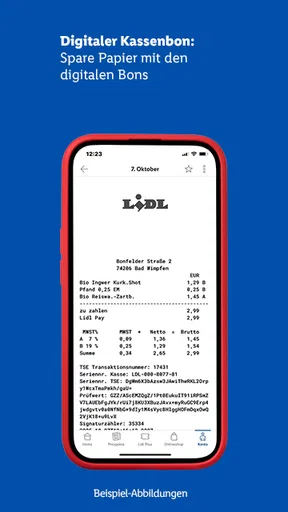
- Receipts are stored in the app for convenient reference.
- Shopping lists help organize items before visiting a store.
- Store offers and services can be checked in one place.
Cons
- Savings depend on available offers and may not suit every shopper.
- Some coupons require activation before checkout.
- A Lidl account is needed to access the app’s features.
- Rewards and promotions may vary by country or store.
- The app is less useful for shoppers who rarely visit Lidl.
FAQs for Lidl Plus
What is Lidl Plus, and what can you do with it?
Lidl Plus is Lidl’s digital loyalty app, designed to make shopping at participating Lidl stores more convenient and potentially less expensive. Depending on your country, it may offer digital coupons, personalized deals, digital receipts, and access to current promotions. You can browse available offers in the app and activate eligible coupons before shopping. Features and promotions vary by market, so check the app’s local terms to see what is available where you shop.
How do I use Lidl Plus coupons and discounts at checkout?
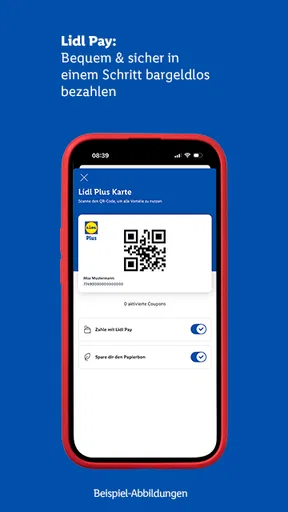
Available coupons generally need to be activated in the app before you pay. At checkout, open your Lidl Plus digital card and have it scanned, or follow the in-app instructions for your store. Eligible discounts should then be applied to qualifying purchases, subject to the coupon’s conditions, expiry date, and any spending or product requirements. Check your receipt after the transaction, and ask store staff about an unexpected result before leaving if possible.
Is Lidl Plus free to download and use?
Lidl Plus is generally free to download and use; its main benefits are access to offers and digital shopping features rather than a paid membership. You may still need an internet connection to download the app, sign in, or load current coupons, and your mobile provider could charge for data. Availability, registration requirements, and specific features can differ by country, so review the app-store listing and local terms before installing.
Does Lidl Plus work in every country and at every Lidl store?
Lidl Plus is available in many markets, but the app’s features, offers, and participating stores are country-specific. Coupons shown in one region may not work in another, and some services may be limited to selected stores or locations. Before relying on a promotion, confirm that the app is set to the correct country and read its conditions. If you are travelling, do not assume your usual coupons or account features will transfer.
What personal information does Lidl Plus collect, and can you manage your privacy settings?
To provide account-based offers and app features, Lidl Plus may request information such as your contact details and shopping-related data; the exact collection and use depend on your country and the permissions you grant. Read the privacy notice during registration to understand how information is handled, including any marketing choices. You can review your device permissions and account settings, and contact Lidl through the channels listed in the app if you have questions about your data.


